Tuesday, January 22, 2019

Exit Interview - January 2019

Exit Interview

COPY and PASTE the following QUESTIONS 
into YOUR final post 
then answer them.


 1. Comment about your work ethic in this course and why.
 ...be honest here


 2. Which assignments did you enjoy and why? 
... list them out

 3. Which assignments did you struggle with and why?
...list them out


I still like this so here it is one last time.
---
Morning Brew
... an excellent email news feed.
I mentioned it back in October.
I still find the content interesting.
... the latest news from Wall St. to Silicon Valley.

give it a try:

Friday, January 18, 2019

Game Journalism FINAL DAY slideshow


Game Journalism FINAL DAY - Slideshow

Today ONLY

START over

DOCUMENT the whole PROCESS

What are you capable of in ONE HOUR of rafting?

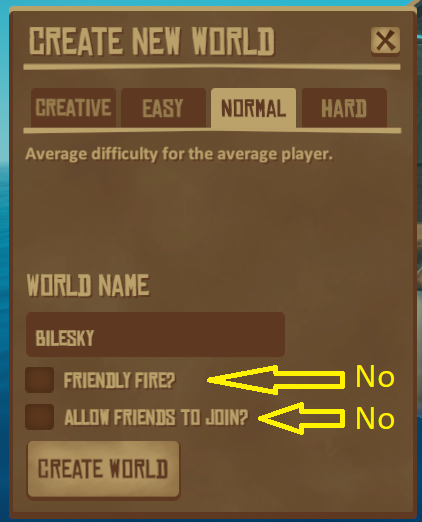
  1.  Create a NEW world - {TAKE A SCREENSHOT}
  2.  Collect Items - {TAKE A SCREENSHOT}
  3.  Build stuff - {TAKE A SCREENSHOT}

{TAKE SCREENSHOTS}
++ 


NOTE: what ever you do {TAKE A SCREENSHOT}

Due to limitations associated with uploading large powerpoint files to Google Slide: Choose your TOP 50 Screenshots

Once DONE:  
Create a PowerPoint slide show of your HOUR of Rafting Survival

Title Page: Title, Explain what you are doing, Your Name


* Upload the POWERPOINT to GOOGLE SLIDES
* Embed the code on your BLOG

Thursday, January 17, 2019

Game Journalism Day 4 - Upgrades

Game Journalism Day 4 - Upgrades

5 Things you have upgraded


1. (original IMAGE) ( upgraded IMAGE) -What does it do better?
2. (original IMAGE) ( upgraded IMAGE) -What's the difference?
3. (original IMAGE) ( upgraded IMAGE) -How does this help?
4. (original IMAGE) ( upgraded IMAGE) -Why did you do it?
5. (original IMAGE) ( upgraded IMAGE) -Was it worth it - why?


examples: 

Hook, Anchor, Water, Grill, Foundation, Spear, Hammer, Axe, Fishing Rod, Crop Plot, Cup, Paddle, Bed


also Your RAFT (IMAGE)


Wednesday, January 16, 2019

Game Journalism Play 4

Game Journalism Play 4

What would you do?


1. If you were to start over.

From memory...layout the first 10 steps

1.
2.
3.
4.
5.
6.
7.
8.
9.
10.

2. What is the best tool to make for survival? (IMAGE)


3.  Your raft to date (IMAGE). What is the best feature on your raft? 

Tuesday, January 15, 2019

Game Journalism Day 3 - Build More

Game Journalism Day 3 - Build More


  • MOVIEs- (as always) Add a title then add your name in the CREDITs
  • (IMAGES) -(as always) - edit the image to add your captions


Build onto your raft (IMAGE)  -show building onto your raft [MOVIE]

What are the right click options when holding a hammer?
Use (IMAGEs) to display each of the 7 options.


Here are more items to show:


  • A second level - (IMAGE)
  • a Net - (IMAGE)
  • a research table - (IMAGE)
  • a crop plot - How to plant [VIDEO]
  • scare crow - (IMAGE)
  • shark bait -Shark eating Shark bait [VIDEO]
  • foraging on an Island - (IMAGE)


Monday, January 14, 2019

Game Journalism Play 3

Game Journalism Play 3

BUILD SOMETHING NEW

Be specific with your answers in relation to the game itself.

1. What NEW things did you build today? [IMAGE]

2. How will these NEW things help you play the game (TIPS&TRICKS)?

3. What strategies are you going to try to focus on tomorrow?

4. Add a picture of your raft. (include a caption) 
Explain why you built the raft the way you did.

Thursday, January 10, 2019

Game Journalism Day 2 - Thrive


Game Journalism Day 2 - Thrive


Things you need to thrive


make a water purifier [IMAGE] then demo it [MOVIE].


Make sure the images have captions and the movies have titles


purifying water


create a fishing rod [IMAGE] then catch a fish [MOVIE]


a fishing rod


construct a simple grill [IMAGE] then cook a fish [MOVIE]


a simple grill in the menu under Food/Water

cooking a fish


  • Sail your Raft   (IMAGE) [VIDEO]


other items to do

(This may take a couple days):

  • Defend from a shark  (IMAGE) [VIDEO]
  • Row your boat  (IMAGE) [VIDEO]
  • Chop a tree  (IMAGE) [VIDEO]
  • Forage under water  (IMAGE) [VIDEO]
  • Ram another raft to pillage it  (IMAGE) [VIDEO]


Wednesday, January 9, 2019

Game Journalism Play 2

Game Journalism Play 2

On the PLAY Day you are required to play the game.


If you are going for an A then you will also answer the following questions. The answers MUST be posted today.

Be specific with your answers in relation to the game itself.

1. What specifically did you do today?

2. What did you learn about how to play the game (TIPS&TRICKS)?

3. What strategies are you going to try to focus on tomorrow?

4. Add a picture of your raft. (include a caption) Explain what you have done to your raft and WHY.

Tuesday, January 8, 2019

Game Journalism Day 1 - Basics


Game Journalism Day 1 - Basics


Note: name the world with the "date -1" etc...
 you might die - a  lot 


put captions in your images
What is this game about? - explain your situation and what you see- add image

DISPLAY for your readers 
the BASICS of the GAME

How do you collect debris?


  1.  explain plus [IMAGE] 
  2.  explain plus [IMAGE] 


IMAGE:


  1. Your raft [IMAGE] 
  2. each type of debris [IMAGE] -what's it good for?
  3. a shark eating your raft [IMAGE] 


Why did you die and what do you need to do about it? 

Monday, January 7, 2019

Game Journalism Play 1

Game Journalism Play 1

On the PLAY Day you are required to play the game.


If you are going for an A then you will also answer the following questions. The answers MUST be posted today.

Be specific with your answers in relation to the game itself.

1. What specifically did you do?

2. What did you learn about about how to play the game?

3. What strategies are you going to try to focus on tomorrow?

4. Add a picture of your raft that includes a caption

Tuesday, December 18, 2018

SketchUp -OnYourOwn -Tiny Home


SketchUp -OnYourOwn -Tiny Home

 Use enough screen shots to show all your work 

FIRST: go to the 3D warehouse - get a flat deck truck trailer - to build on top 

  •  carefully remove the front 1/3 of the trailer 
PLEASE CUT OFF 1/3 
DO NOT JUST SHRINK IT


  •  add pull out window to the hidden side and french doors to the back 
  •  add your name 


SECOND: build this bed - put it inside the trailer house 

  •  colour it 
  • add your name 


THIRD: Back yard ski ramp  build the ramp -place it such that a car can be parked on top of the trailer - add a car 

  •  paint it 
  •  add your name 


 Place this at an airport pulled by an 'airstairs' truck surrounded by a chain-link fence that YOU made - think components 


Thursday, December 13, 2018

SketchUp Room with Pool

SketchUp Room with Pool

Follow the PDF tutorial

add:

  • paint
  • windows
  • decor
  • remove erroneous lines
  • your name
  • note: for Steps and Railing Components


select 
  - choose move tool 
    - hold CTRL key 
      - move diagonal 
         - type 9/

-same for the railing  note /9 and /50


This shows the draw elements with windows but without the decor

Pool - windows - stairs - railing - name

hole in floor - steps to pool

Build a railing around the bottom floor too!


Monday, December 10, 2018

SketchUp - Garage Sale


SketchUp -Garage Sale


Create a Garage Sale 

1. Save your SketchUp projects - as .skp files 

  • Click on the FOLDER next to SAVED 
  • Choose Download then 2018

2. Create a New model 

Add the house - [INSERT-your computer] create a driveway, create a yard of grass - add a fence from the 3D warehouse 


3. Add your dog house to the yard -get a dog 

4. Place your Fishtank TABLE in the garage 

5. Now for the Garage Sale 

  • get 3 tables from the 3D warehouse 
  • place 1 inside the garage with the fishtank table 
  • place 2 tables on the driveway 
  • draw a Garage Sale sign 
  • add 3D Warehouse items to the tables 
  • add 3D Warehouse items inside the garage
  • add 3D Warehouse items onto the driveway
  • keep everything TIDY and ORGANIZED 
  • Shrink down your ROOM and place it on a table 

Garage sale ideas: Tools, Furniture, kitchen items, garden tools, shoes and handbags, jewelry, books, appliances, camping gear, exercise equipment, toys


Thursday, December 6, 2018

Sketchup -Getting Started -Part 4 -Table with Fishtank

Sketchup -Getting Started -Part 4 
(Groups and Components)


  • Groups prevent new edges from merging with the group
  • Groups and copies of groups are unique
  • All copies of components are linked


 This LINK leads to a set of 4 'Getting Started' Videos 

 do Part 4 

Move the man diagonally over to another quadrant but keep him in view.


  1. Place a single drawer on the opposite side
  2. Draw a rectangular fishtank on top - add (at least 4 different) 3DWarehouse fish
  3. add your name


Single draw side - back side of toy


two drawer side - front of toy - Name


Wednesday, December 5, 2018

Sketchup -Getting Started -Part 3

Sketchup -Getting Started -Part 3


This LINK leads to a set of 4 'Getting Started' Videos

do Part 3

Do this: Your computer room

walls - painted and textured
floor - textures
windows - trim painted - glass painted
add your name


from the 3D Warehouse

 -desk - gaming chair - rug - fridge - hottub - couch - big screen TV - chandelier + more!


Tuesday, December 4, 2018

Sketchup -Getting Started -Part 2

Sketchup -Getting Started -Part 2


This LINK leads to a set of 4 'Getting Started' Videos

do Part 2

Do this:


note peaked roofs-corner window -garage -painted offset and pulled trim -tiled roof house - removed windows and doors

door inside garage -painted trim and inside walls

round corner window - offset and pulled - painted trim

Monday, December 3, 2018

Sketchup -Getting Started -Part 1

Sketchup -Getting Started -Part 1

Chrome may crash "Aw Snap" - if so switch to Firefox


FIRST:      Start Tour
SECOND: Start Modeling


This LINK leads to a set of 4 'Getting Started' Videos

DO THESE using SketchUp Web


first do the tutorial - then do the assignment

PART 1  - draw a dog house - leave the man in the model

  • add a window and door to each side
  • only the front door has steps
  • 2 chimneys - paint as brick
  • paint the doors with a wood material
  • paint the windows with glass or a window covering
  • paint the walls and edges
  • add your name to the model

use the snipping tool to post your model
use enough images to capture all 4 sides


Friday, November 30, 2018

HEALTH WEEK Cyber Criminal 06

HEALTH WEEK Cyber Criminal

FIND -SNIP -CREATE the following slideshow


FIND -RECORD -EDIT -CROP
the following 2 ANIMATIONS


HEALTH WEEK Spam Scam Slam 05

HEALTH WEEK Spam Scam Slam

Create the following SLIDESHOW


CREATE the following ANIMATED GIF

record - edit - crop


Exit Interview - January 2019

Exit Interview COPY and PASTE the following QUESTIONS  into YOUR final post  then answer them.  1. Comment about your work et...