Friday, October 12, 2018

Friday POST -October 12, 2018 -Photoshop Tutorials


Using one of your tutorials.

Create something complicated from 2 or more of:


  • Display your layers
  • Describe how it was done

Tuesday, October 9, 2018

Morning Brew


Stay in-the-loop

this weekday newsletter is a quick way to stay informed.


...business related

...tech related


click to sign up


Monday, October 1, 2018

Photoshop -3 tutorials

1. My tutorial 3x

3D Effect in Photoshop CC  

Pop out effect


2. or your tutorial 3x
from your
Friday POST Sept 14
post your tutorial - then your version (enhanced)


Friday, September 28, 2018

Friday Post -September 28, 2018


1. Create the App with 5 buttons


  • Your blog - as the main link


  • Add what the tutorial asks for : twitter and instagram

plus 3 more buttons


2. Write a short review of thunkable. Explain what it is, what you have done with it and give your opinion.

Wednesday, September 19, 2018

Thunkable -Intermediate

Thunkable -Intermediate

Intermediate       there are 10 !

4, 5, 6, 8, 9, 10 require thunkable classic
(although - all could be done with the classic version)
These will be omitted or marked as a BONUS 

  • Post a screenshot -the blocks -a link to the app
  • make sure your name is in the app


1. The Tutorial: https://www.youtube.com/watch?v=0fjLYXE0YQE


My Version: Int-1-Button changes


2. The Tutorial : https://www.youtube.com/watch?v=6gsReE1q5Sc


My Version: Int -2- Photo Sharing

to make this work you will need a:

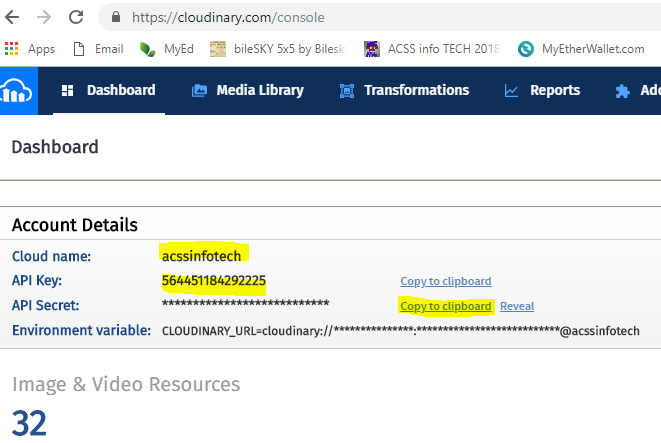
under DESIGN in thunkable choose Media_DB1 - On-the-right add the values above

you will also need FireBase info - the account is automatic - no need to logon

instructions
  • a firebase database   Choose Get Started and create a database (call it "Photo Sharing")
  • once you have this choose project overview
  • click on 

 the following highlights the info you will need - don't use mine!

In Thunkable - DESIGN - choose Realtime_DB1
on-the-right choose Go to Firebase setting - add your info
SETUP your database in firebase
Click on Database - choose realtime database - click on Rules (tab) - make sure the database (look above rules tab) is set to "Realtime Database"
rewrite  read: true, and write: true
then click PUBLISH

back to thunkable
check your blocks add a second button to DOWNLOAD the image you sent to cloudinary


My Version: Int -3- Screen Navigation


Tuesday, September 18, 2018

Thunkable -Basic


Thunkable iOS Overview

From their website:
advice: do the tutorial - make sure it works - personalize it
add name - design - extra functions
  • Tutorial 1: My Phone Can Talk!
  • Tutorial 2: Click for Sound
  • Tutorial 3: Random Answers
  • Tutorial 4: Image Recognition
  • Tutorial 5: Translator
example POST: Name of APP, link to APP, screenshot

1.  My Version: My Phone Can Talk!

2.  My Version: Click for Sound

3.  My Version: Random Answers

4.  My version: Image Recognition


5.  My Version: Translator (Italian)

other YouTube Tutorials

https://www.youtube.com/channel/UCTVZRyybOCDBL2zLXSeQVsw/videos


Intermediate

10


pong!


Thursday, September 13, 2018

Friday POST Sept 14


1. 6 shortcuts SPECIFIC to Photoshop and describe what they do.

ex:  CTRL - T ...the transform tool, for enlarging, shrinking or flipping images


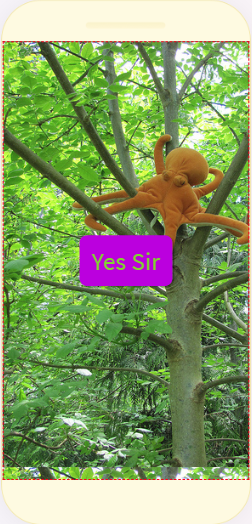
2. Remove everything but the octopus in the following image. Describe how you did it. What are the shortcuts for the tools you used? 


3. Find a tutorial on YouTube of some interesting Special Effect (that is not too simple >10 minutes) in Photoshop. Post the tutorial. Get ready to master it at a later date.


ex: 

3D effect in Photoshop cs6 

Pop out effect | Photoshop Tutorials

Exit Interview - January 2019

Exit Interview COPY and PASTE the following QUESTIONS  into YOUR final post  then answer them.  1. Comment about your work et...